
Reading time:9 min reads



Most emerging speakers don’t immediately see the value in developing their talks into videos.
Videos directly demonstrate your expertise and ability to speak, and that will go a long way in helping organizers decide whether you are the right fit or not.
Event organizers are going to be more confident about hiring you if they can see that you are genuine and comfortable speaking about your subject.
Whenever possible, record your presentation. If the event is filming, get a copy of the footage, but if no one is filming, you can set up a camera and film yourself.
Read these tips from marketing expert Baldwin Berges SpeakerHub Masterclass “Create a lasting business impact with your talks” on how to film your presentations effectively and economically.
Improving your SEO and creating leads
When uploading your video to YouTube, be selective with the words you use in the title and description matter.
The goal of this is to help Google and other search engines connect viewers with your video.
Use strategic keywords. Keywords are important because they make your video findable when people are searching for information related to your topic.
Make sure you have one main keyword in your video title, and use it again in your video description. Keywords will help people find your videos with ease, and very little work is required from you to promote them.
Give viewers a direction to take: like a way to contact you. Include a link at the bottom of your video description to your SpeakerHub profile or your website.
If you haven’t checked out Canva yet, we’d highly recommend it; here at SpeakerHub we use it regularly because it is so easy to use and creates amazing, low-cost designs.
You can make beautiful slides using Canva’s presentation templates. Find out more about their presentation tools (as well as the other leading slide presentation tools) in our article “Creating Effective Presentation Slides: Which Platform to Use?”
The reason we singled Canva out for this article is to talk about their Magic Resizer tool (For Work, $10/month).
The Canva Magic Resize tool allows you to automatically create multiple sizes of your design into the templates of your choice, immediately turning your presentation into designs optimized for social media, whether for posts, ads, or banners.
Here is a list of the sizes and uses you can customize your presentation to:
Selection of Magic Resize options:
Want to know more about this? Jump to the article “The Ideal Image Sizes for Your Social Media Posts: Guidelines for All 6 Major Social Networks” for the optimal image sizes for social media.
Take the most impactful slide in your presentation, instantly turn it into a dozen different sizes, and use it all over the internet to promote your expertise.
Use Buffer to schedule and post your content.
Once you have a handful of size-appropriate images from your presentation, you can use the social media scheduling tool Buffer to automatically drip your content on your platforms throughout the day or weeks ahead.
Schedule posts through Buffer on:
The free tool from Buffer gives you the space for 10 posts across all the networks. If 10 post isn’t enough, you can upgrade your account to the Awesome Plan which will allow you to schedule 100 post across 10 accounts for $10/month.
Not sure which social networking platforms you should be on? Check out these two articles:
While relying 100% on automatic tools for social media is not ideal, they can be a fantastic way to make sure you are still generating leads and interest while you are on the road or focusing on other sides of your speaking business.
Marketing your expertise can be challenging.
While you can showcase the depth of your expertise through books, articles and white papers, getting a very busy event organizer to read through your well-thought-out ideas can be close to impossible.
They want to be confident that you know your topic inside out, but with dozens of other speaker applicants (who also have books, articles and white papers) going through all the content is a daunting task. This where your slides can become a huge asset.
If you can aptly display your expertise in a highly visual and engaging way: the organizer might be more inclined to read your other material. Think of your slides as a teaser for you more in-depth content (ie. your book).
The best place to showcase your slides online is SlideShare.
SlideShare has 70 million users with 159 million page views per month, and was designed to make your presentations shine. It has become an a B2B marketplace: generating 5x more traffic from business owners than YouTube, Facebook or Twitter.
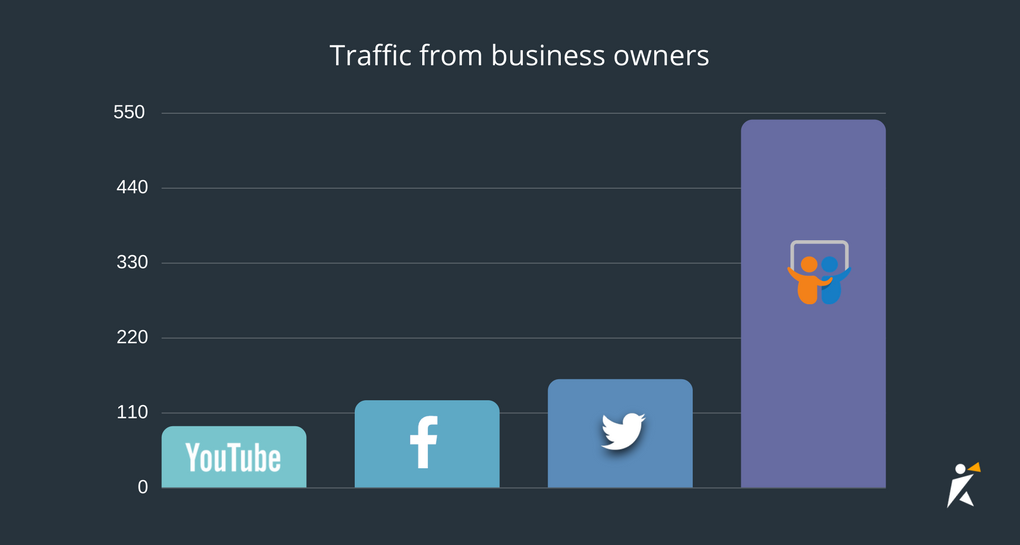
If you are not using the SlideShare to promote your presentations you are missing out on one of the top marketing tools for speakers.
Once you’ve uploaded your presentation, make sure you feature your presentation on SpeakerHub so that event organizers can see your latest content. To add a SlideShare presentation, just go to “Edit Profile”, and go to the “Media” section.
Simple add the link to the section “Slides and Presentations”.
Ideas for getting more views on SlideShare:
Posting a profile on SpeakerHub will help you get new speaking opportunities. Setting up an account is free and easy. Find out more here.
Popular Categories