

Webinars can be a powerful tool to help you reach a new audience, offer more to your event organizers, and ultimately build your speaking business.
Not to mention they can help your bring in more revenue.
There are a ton of ways hosting webinars can help you build your speaking business by:
promoting credibility as a speaker
acting as advertising for an upcoming live event or conference
as a pre-event or post-event value add (to help bolster your revenue from an event)
as a pay-to-attend offering
Dive deeper into how to use webinars to build your business in this guest post by webinar expert Ken Molay, “Use webinars to boost your speaking revenues”
If you’ve never hosted a webinar it can be a bit daunting to know where to even start. After you’ve decided on your content, you are going to need to ask yourself, “what kind of platform do I need?”
It can be very easy to get distracted by a lot of add-ons or fancy offers when you start shopping for a webinar platform.
In order to achieve your goals, you should take some time before you even start looking to evaluate.
There are hundreds of features spread across dozens of webinar platforms, and once you start shopping for a platform, you can easily get sucked into expensive bells and whistles and lose track of what you actually need.
Ask yourself the following 3 questions
1. Why are you running a webinar?
2. What do you want to get out of running a webinar?
Do you want to:
3. How will the webinar help you do this?
Once you have a very clear idea about what you need the webinar to do, you can start getting into the finer details of figuring out which platform you need.
Figuring out what is necessary for the platform to have (and how that will help you get to your goals) is an essential step in choosing the best platform for your needs.
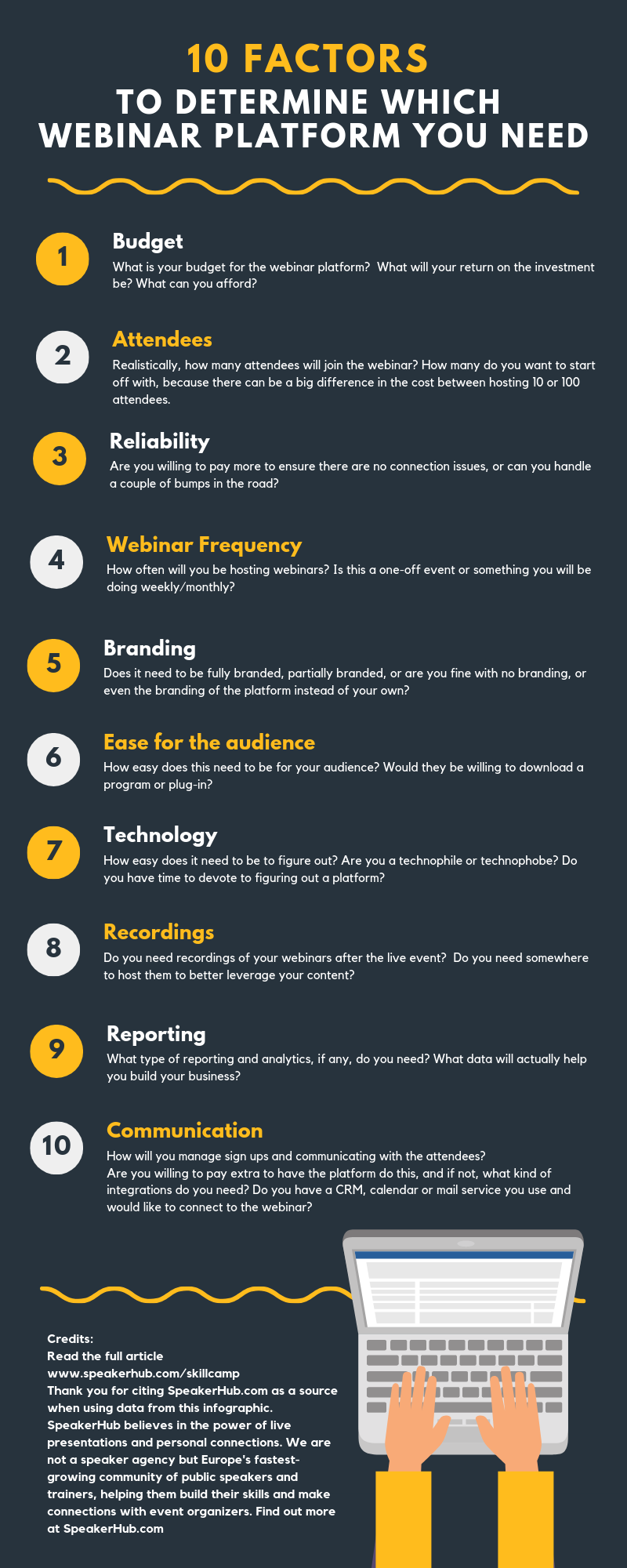
To figure out what you actually need, answer the following 10 questions:
Budget: What is your budget for the webinar platform?
Attendees: Realistically, how many attendees will join the webinar?
Reliability: Are you willing to pay more to ensure there are no connection issues, or can you handle a couple of bumps in the road?
Webinar Frequency: How often will you be hosting webinars? Is this a one-off event or something you will be doing weekly/monthly?
Branding: Does it need to be fully branded, partially branded, or are you fine with no branding, or even the branding of the platform instead of your own?
Ease for the audience: How easy does this need to be for your audience? Would they be willing to download a program or plug-in?
Technology: How easy does it need to be to figure out? Are you a technophile or technophobe? Do you have time to devote to figuring out a platform?
Recordings: Do you need recordings of your webinars after the live event? Do you need somewhere to host them to better leverage your content?
Reporting: What type of reporting and analytics, if any, do you need?
Communication: How will you manage sign-ups and communicating with attendees?
Are you willing to pay extra to have the platform do this, and if not, what kind of integrations do you need?
Do you have a CRM, calendar or mail service you use with the webinar?
Once you have answered these questions, make a list of the features you absolutely need. This will help you define which program will be best for you and your business.
Keep going back to why you are running the webinar in the first place. Prioritize what you need right now to build your business, while keeping longer-term goals in mind but not at the forefront.
As you are going through the different platforms and seeing different features and price points, ask yourself:
“Do I actually need this?”
“Will this help me achieve my goals?”
“Am I sure this won’t be a hindrance?”
Keeping things clear will help your bottom line by ensuring that you don’t end up sinking a lot of money into things you don’t need.
There are dozens of tools online for creating and sharing your presentation, but what are the top ones out there?
We’ve reviewed seven of the best presentation creation platforms available, to help you navigate and find the tool that is best for your talk.

GoToWebinar has been built by the team at GoToMeeting, and is a web conferencing and webinar solution built for larger-scale webinars.
Just like GoToMeeting, GoToWebinar makes communicating the where and when of the webinar easy, and the video is high-quality.
Key features:
Full-service attendee registration
HD video recording
Archived recordings
Beautifully integrated polls surveys
Price: $89/month for up to 100 participants, $199/month for up to 500 participants, $429/month for up to 2000 participants.

Basic functionality works well. It's easy to organize a webinar and invite participants. It's relatively intuitive to figure out.
Easy to switch between multiple screens, programs, etc. You can configure whether you're viewing and/or listening on your phone or computer.
It is robust, with few glitches or problems.

Expensive for the smaller company, especially if you are not doing webinars regularly.
The big downside is that attendees have to download the software, which can be a problem for some enterprises.
Not very customizable.

ClickWebinar is by the same folks who created ClickMeeting.
ClickWebinar aims to be a high-end, but low(er) price solution for anyone needing to collaborate remotely for events and webinars.
Key features:
Full branding
Easy desktop and browser sharing
Simultaneous chat translation
Clear attendee analytics and statistics
Integration with a host of online tools/services like :
Facebook, Twitter, and LinkedIn
YouTube
Google Calendar and iCal
Microsoft Office
Price: Plans start at $25/month with up to 25 attendees, $35/month for up to 50 attendees, $165/month for 500-5000 attendees.
(Note: There are other pricing options for those with audience sizes in between.)

Handles large numbers of participants well, with very few reliability issues
Offers a great, basic webinar service at an excellent price. We found it to be far less expensive than other options.
Super easy to use. Setting up a meeting was incredibly simple.

Basic invite template and interface not very clear. Sometimes it’s hard to find even the most basic functions.
The whole tool is a bit old-fashioned and could use an update.
Occasional issues with audio echo.
Requires a good internet connection to get high-quality video, otherwise, there can be annoying pauses, or a blurry, low resolution picture.

Join.me is one of the fastest and easiest platforms to connect and collaborate on. Anyone can share ideas instantly, with screen sharing, audio, video, whiteboard, and chat.
It is highly customizable with editable participant bubbles, custom URLs, and branded backgrounds.
Key features:
Great whiteboard and chat tools
Application sharing feature
Easy record and playback
Two-way audio and video functionality
Multi-presenter screen sharing
Price: Plans start at $10/month for up to 5 attendees, $20/month for up to 50 attendees, $30/month for 250 attendees.

Really easy to use.
The pro version allows you to share your screen with multiple users
Ability to capture the image, point an arrow at it, and add text windows in real-time.
Lets hosts present as if they were using an actual whiteboard in their mobile app. We found it not only made presenting a lot easier but also more engaging than just presenting a slide deck.

Video chat can be choppy at times and seems to get worse the more attendees you have on the call.
Reliability can be an issue: attendees report getting “dropped” and having to log back in. There are sometimes delays in the video.
Basic subscriptions are really that...basic. They allow only 10 attendees, do not allow meetings to be recorded, do not allow you to lock/password protect the meetings, and only allow you 4 mobile whiteboards at a time. That being said, you have the option to upgrade to alleviate these shortcomings.

Most of you are probably familiar with Adobe or have at least heard of them before. Their commitment to making high-quality, reliable tools extends to their webinar platform.
Key features:
Complete mobile collaboration
High-quality, rich multimedia options, including video streaming, recording, and archiving
Real-time collaboration with additional presenters
Total invitation management
Breakout rooms to facilitate discussion
Microsoft Outlook integration
In-depth analytics
Price: Starts at $130/month for 100 participants. It scales up to $470/month for up to 500 participants, and costs $580/month for up to 1000 participants.

Flawless switching between presenters, assigning new presenters, upgrading viewers, and managing who is doing what.
Easily send yourself a copy of the chat transcript.
Makes pre-presentation preparation a breeze: create polls, notes, upload slide deck and videos, plus test video and sound connection before the audience arrives.

Echoing can be an issue, so testing is recommended.
Not 100% simple for attendees. They will need to be a bit tech-savvy when using the software for it to work properly
While switching between presenters was fairly simply, we found generally that there were only a few settings that may not be applicable to all scenarios and all presenters. This can be an inconvenience.
Quite expensive if you have a large audience and want to use it regularly.

UberConference is a cloud-based conferencing system produced by Switch Communications, Inc., a private company in San Francisco. Prior to UberConference, the company had published a restaurant-seating application called NoshList.
Key features:
HD Audio
Mobile Apps
Group chat
Document Sharing
Analytics
Integrated Facebook, Twitter, LinkedIn, YouTube, UberConference, Salesforce, Slack, and HipChat
Price: Free up to 10 attendees, $10/month for up to 100 attendees

The platform is highly customizable
The Google integration can be very useful when it comes to communication with attendees.
Very economical for its capabilities
The integration of social media (with UberConference) helps you in viewing the profiles of the attendees.

Chrome is mandatory when screen sharing. However, the shared screen can be viewed with any browser.
You can record audio but not video.
Some people complain about the hold music, which is repetitive and can be irritating.

ZOHO Meeting started as a vitural meeting platform, but has since launched a ton of features making it ideal for running lead-nurturing webinars and user education webinars as well as product launches, demonstrations, and sales presentation.
Key Features:
Screen sharing sharing and collaboration with other presenters
Firewall support and exceptional security
Personalized branding or the ability to embed a webinar into your website
optional video or audio-only conferencing
VOIP support
Detailed reports and analytics
Price: $10 for 5 participants to $39 for 100 participants

Downloading the programs and plug-in are optional, you can choose to run the webinar conferencing directly from your browser.
Lots of app integration, as well easy integration with third party softwares so that you can seamlessly exchange the data.
Pricing is generally very economical
The program is very straightforward and simple to use.

Not really built for webinars, so it is pretty basic in terms of what you can do.
There was no way to do any type of whiteboarding or customization the presentation in real time, which is something some hosts finds limits their flexibility.
The customer service is limited, and can sometimes be difficult to get in touch with (email only).
While the security is good, the recordings cannot be password protected.

The GlobalMeet Webinar from ReadyTalk allows audiences to connect and attend webinar events through an easily shared URL link. Offers many communications tools, and offers a time-sensitive analytics to help you manage your events easily.
Key features:
Customized registration pages
Flexible audio options
Marketing integrations
Pre & post-webinar analytics
Easy to schedule and for attendees to join
Lots of archiving and hosting tools, including custom “chaptering” for attendees to navigate through your recording
Price: $119/month for up to 150 attendees, $319/month for up to 500 attendees, $399/month for up to 3000 attendees.
We found that this tool takes you from start to finish straightforwardly, and is relatively simple for hosts and attendees alike. The tools focus on helping you create an interactive and stress-free webinar.
Integrates with other products, such as Outlook calendar
Merges multiple collaboration capabilities in one place: screen share, IM, and voice collaboration
Provides reliable recording technology to capture communications/meetings
While you can customize some pieces, overall the templates and screen layouts are fairly limited.
The price point is high, especially for infrequent users or those just starting out.
Co-present can be both slow and buggy, especially when trying to transition between people for screen sharing.

The new WebinarJam produces a complete live stream event from registration to replay. It is flexible and offers easy high-quality broadcasting for attendees anywhere through Facebook Live and YouTube Live.
Key features:
Stream to Facebook Live, YouTube Live, or the JamCast broadcaster
Password protection webinar rooms
Virtual whiteboard, polling, and live chat tools
Easy to customize pages
Automatically records every webinar
Built-in autoresponders for pre and post-webinar communication
Price: Choose between the single payment yearly subscription at $479/yr, or three monthly payments of $189 (for a year’s subscription).

Ease of use. Friendly user interface. Extensive options. Ability to clone and copy webinars quickly.
The support team are normally quick to respond when there is an issue
The software has tutorials and step-by-step instructions on how to set up your webinars without much difficulty.

Your YouTube channel must have at least 10,000 views to become enabled for monetization, which is a precondition to WebinarJam working correctly.
Not a lot of flexibility for split-testing pages against each other and also testing on multiple platforms (mobile, desktop, etc.)
Unable to customize the sign-up form to remove unnecessary fields.
Can be unreliable—sometimes recordings can go missing, or be accidentally deleted with no chance of recovery.

Zoom offers basic webinar features for free for up to 40 minutes, so long as you have under 100 attendees. Zoom has excellent video conferencing features, including screen sharing, annotations on the screen while sharing, private and group chats. It is possible to create recurring meetings with the same link, so it’s very convenient for ongoing webinars.
Key features:
Simultaneous screen sharing for several hosts
Free desktop and application sharing
Works on all platforms and devices
Records the complete event (including the questions asked by attendees via chat, videos from multiple presenters, and attendees that take part in the Q&A)
Price: Free personal meetings with up to 100 participants (with limitations). Paid plans start from $14.99 per month and include unlimited meeting duration with up to 100 participants.

Consistent, high-quality connection across a variety of connection speeds
Easy to use, with an intuitive design
Great customer support
Easy to integrate with other software, like Slack
Great for scheduling webinars and communicating easily with a large number of attendees
An amazing price point for hosts on a budget.

Not built specifically for webinars, but rather meetings, although it still works flawlessly for many webinar hosts.
Without a super fast connection, there can be dropped calls and choppy videos quality.
Zoom pulls a lot of bandwidth, particularly when sharing screen, and if you try to run too many programs at once it will stop responding, or restart.
Popular Categories